
通讯录模块
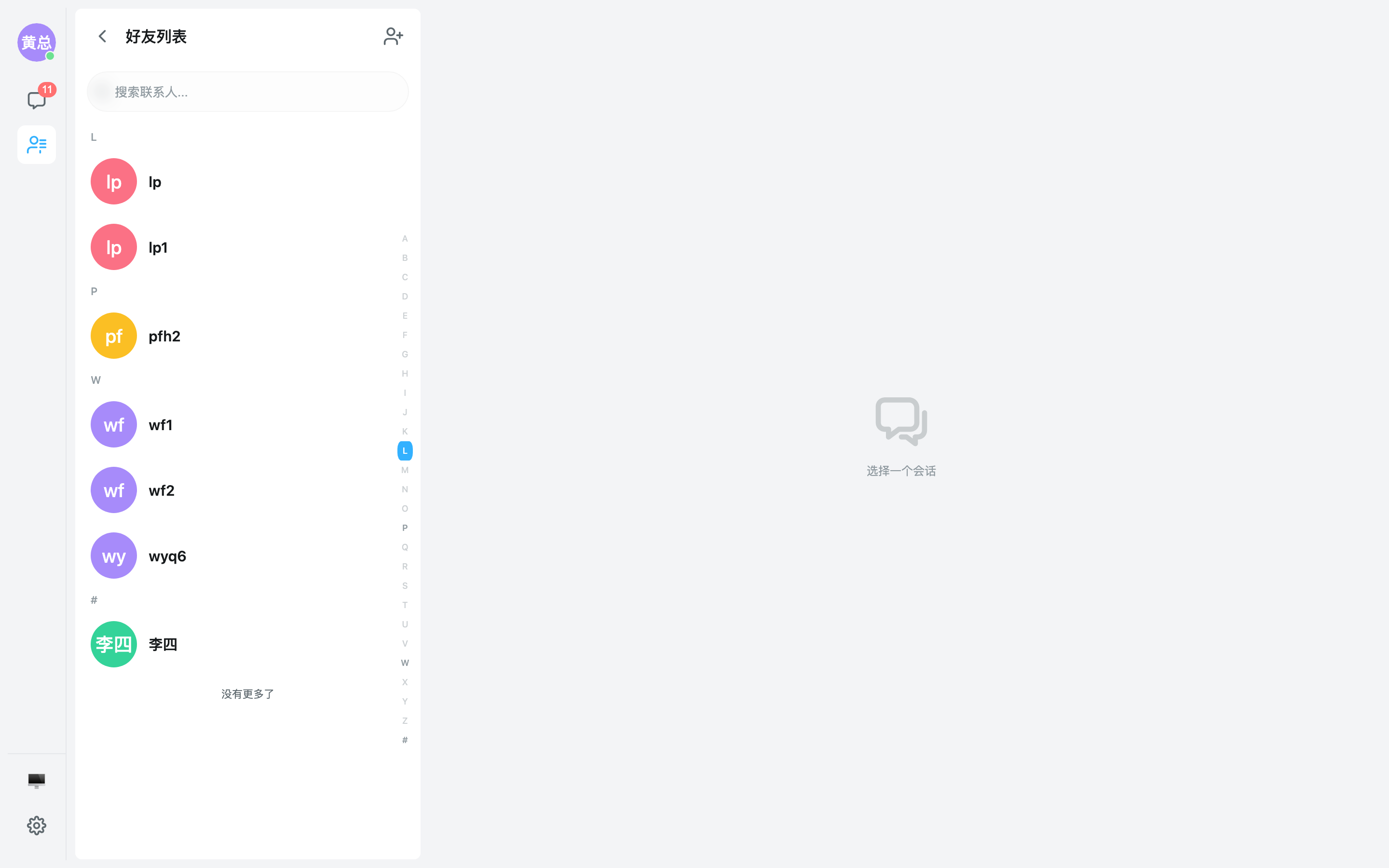
通讯录容器,聚合「通知 / 群组列表 / 好友列表」三大入口:首页入口导航 + 好友列表子视图(字母分组、在线状态默认关闭可显式开启、多选)+ 群组列表子视图 + 通知子视图,内置视图切换过场动画。
使用方式
组件以 EmContactContainer 为名导出。需在 EmUIKitProvider 内使用:
<script setup lang="ts">
import { EmUIKitProvider } from '@easemob-community/uikit-im'

function goDetail() {
  // 跳转联系人详情页
}

function onCreateGroup() {
  // 打开创建群组弹窗
}
</script>

<template>
  <EmUIKitProvider
    app-key="your-app-key"
    :auto-init="true"
    enable-contact
  >
    <div style="height: 100vh; width: 360px;">
      <em-contact-container
        title="通讯录"
        :notice-count="3"
        @contact-click="goDetail"
        @create-group="onCreateGroup"
      />
    </div>
  </EmUIKitProvider>
</template>
Provider 需开启
enable-contact(默认开启)才会自动拉取好友与群组数据;notice-count用于展示「通知」入口的徽标数量。
联系人列表项
EmContactItem 是联系人列表的基础展示单元,支持副标题、在线状态、头像形状与选择模式:
联系人排序(sortBy)与拼音分组
联系人子列表(EmContactList)与通讯录容器的联系人子视图通过 sortBy / groupBy 控制排序与分组:
sortBy:'none'(保持 store 顺序)|'pinyin'(按 remark/name 拼音字典序升序)|(a,b)=>number(自定义比较器),默认'none'groupBy:'alphabet'(A-Z +#字母分组)|'none'(不分组)|函数,默认'alphabet'
⚠️ 关键:UIKit 不内置任何拼音库。 要让
sortBy='pinyin'真正按中文拼音排序、让groupBy='alphabet'把中文姓归入 A-Z 分组,必须先调用setPinyinAdapter注入拼音 adapter。未注入时resolvePinyin返回null,中文会降级为按原文localeCompare排序,并统一落入#分组。
注入拼音 adapter
UIKit 把具体拼音库(pinyin-pro / tiny-pinyin / pinyinlite …)解耦成可注入的 adapter,接口:
type PinyinAdapter = (text: string) => {
  pinyin: string       // 完整拼音(小写无声调),如 "zhangsan"
  initials: string     // 首字母缩写(小写),如 "zs",用于拼音搜索
  firstLetter: string  // 首字母大写 A-Z 或 '#' 兜底,用于字母分组
}
在你应用初始化时(渲染联系人列表之前)调用一次即可:
import { pinyin } from 'pinyin-pro'
import { setPinyinAdapter } from '@easemob-community/uikit-im'

setPinyinAdapter((text) => {
  const full = pinyin(text, { toneType: 'none', type: 'string', nonZh: 'consecutive' })
    .replace(/\s+/g, '')
    .toLowerCase()
  const initialsRaw = pinyin(text, { pattern: 'first', toneType: 'none', type: 'string' })
    .replace(/\s+/g, '')
    .toLowerCase()
  const firstChar = initialsRaw.charAt(0).toUpperCase()
  return {
    pinyin: full,
    initials: initialsRaw,
    firstLetter: /^[A-Z]$/.test(firstChar) ? firstChar : '#',
  }
})
setPinyinAdapter 是模块级全局单例:注入一次对当前页面所有联系人 / 群组列表生效;传入 null 可解除注入(恢复默认行为)。
配套能力
- 拼音搜索:注入 adapter 后,搜索框同时按完整拼音 / 首字母缩写匹配(
useContactFilter/useGroupFilter)。 - 清理缓存:
resolvePinyin内部按文本缓存(上限 1000)。联系人备注 / 名称更新后可调用clearPinyinCache()(同样从@easemob-community/uikit-im导出)刷新结果。 - 群组列表:群组子列表走同一机制,
group-sort-by="pinyin"/group-group-by="alphabet"。
联系人详情 EmContactDetail
EmContactDetail 联系人详情模块:头像(含在线状态)、昵称 / 用户名 / 用户 ID、备注编辑(行内弹窗)、发消息胶囊按钮,底部提供「拉黑 / 取消拉黑」「删除联系人」操作(带确认弹窗),SDK 调用与结果 toast 由组件内部完成。
<script setup lang="ts">
import { EmUIKitProvider, EmContactDetail } from '@easemob-community/uikit-im'

function onSendMessage(userId: string) {
  // 跳转到与该联系人的单聊
}

function onBlockChanged(userId: string, blocked: boolean) {
  // 拉黑 / 取消拉黑成功
}

function onDeleted(userId: string) {
  // 删除联系人成功,返回列表
}

function onRemarkChanged(userId: string, remark: string) {
  // 备注保存成功
}
</script>

<template>
  <EmUIKitProvider
    app-key="your-app-key"
    :auto-init="true"
    enable-contact
    enable-blocklist
    enable-presence
  >
    <div style="height: 100vh; width: 360px;">
      <em-contact-detail
        user-id="user-id-to-show"
        @send-message="onSendMessage"
        @block-changed="onBlockChanged"
        @deleted="onDeleted"
        @remark-changed="onRemarkChanged"
      />
    </div>
  </EmUIKitProvider>
</template>
底部「拉黑 / 取消拉黑」操作需开启
enable-blocklist(默认开启);头像在线状态需开启enable-presence。
ContactDetail API
Props
| 属性 | 类型 | 默认值 | 说明 |
|---|---|---|---|
| userId | string | — | 联系人用户 ID |
| contact | UiContact | null | null | 外部已缓存的联系人摘要(可选,用于首屏快速展示) |
| enablePresence | boolean | — | 是否展示在线状态,默认跟随 Provider 全局 enablePresence 配置; 主动查看场景(详情页)默认展示,传 false 可单独关闭。 Whether to show presence. Defaults to the global enablePresence feature; pass false to opt out. |
Events
| 事件名 | 参数 | 说明 |
|---|---|---|
send-message | userId: string | — |
deleted | userId: string | — |
block-changed | userId: string, blocked: boolean | — |
remark-changed | userId: string, remark: string | — |
Slots
| 插槽名 | 说明 |
|---|---|
avatar | — |
header | — |
alias | — |
extra | — |
actions | — |
footer | — |
插槽
| 名称 | 作用域 | 说明 |
|---|---|---|
avatar | { userId, avatar, displayName, presence } | 接管头像区(默认渲染头像 + 在线状态点) |
header | { userId, displayName, nickname, presence } | 接管名称与 Username / UserID 信息区 |
alias | { userId, remark } | 接管备注行;接管后内置备注编辑入口不再渲染 |
extra | { userId, userInfo, contact } | 在备注行与操作按钮之间插入自定义内容 |
actions | { userId } | 接管「发消息」胶囊按钮区 |
footer | { userId, blocked } | 接管拉黑 / 删除按钮区 |
通知列表 EmContactNoticeList
EmContactNoticeList 通知列表模块:聚合展示好友申请与群邀请(头像、附言、时间、接受 / 拒绝按钮),已处理项展示状态标签,store 中已是好友 / 已入群的 pending 申请会自动显示为「已接受」。通常无需单独引入——通讯录容器的「通知」子视图默认渲染的就是该组件;单独引入适合自绘通知页场景。
<script setup lang="ts">
import { EmUIKitProvider, EmContactNoticeList } from '@easemob-community/uikit-im'
import type { UiContactInvite } from '@easemob-community/uikit-im'

function onAccept(invite: UiContactInvite) {
  // 接受成功(SDK 调用由组件内部完成)
}

function onDecline(invite: UiContactInvite) {
  // 拒绝成功
}
</script>

<template>
  <EmUIKitProvider app-key="your-app-key" :auto-init="true" enable-contact>
    <div style="height: 100vh; width: 360px;">
      <em-contact-notice-list persist="local" @accept="onAccept" @decline="onDecline" />
    </div>
  </EmUIKitProvider>
</template>
ContactNoticeList API
Props
| 属性 | 类型 | 默认值 | 说明 |
|---|---|---|---|
| invites | UiContactInvite[] | undefined | — |
| loading | boolean | false | — |
| persist | InvitePersistType | false | 是否持久化未处理通知(true = localStorage,或指定 'local' / 'session') |
Events
| 事件名 | 参数 | 说明 |
|---|---|---|
accept | invite: UiContactInvite | — |
decline | invite: UiContactInvite | — |
persist传true等价于'local'(localStorage),'session'仅存于会话级存储;开启后通讯录首页徽标在刷新后也能立即显示红点。
Props
容器外观
showHeader:是否展示头部,默认truetitle:Header 标题文本headerAlign:Header 对齐方式,默认'left'showSearch:统一搜索框开关,默认trueshowScrollToTop:是否展示滚动置顶按钮,默认truetransition:视图切换过场,'none' | 'slide' | 'fade',默认'slide'
title仅作用于首页(home)头部;好友列表 / 群组列表等子视图头部文案跟随各自入口label(默认走 i18n「好友列表」「群组列表」,可用contactLabel/groupLabel覆盖)。
聚合入口
showNotice:是否展示「通知」入口,默认true(showNewRequest为废弃别名)showGroup/showContact:是否展示「群组列表」/「好友列表」入口,默认truenoticeCount:通知徽标数量,默认0(newRequestCount为废弃别名)groupCount/contactCount:入口右侧数量,不传默认取 store 实际数量autoEntryCount:是否自动推断入口数量,默认trueentryOrder:入口顺序,默认['notice', 'group', 'contact', 'blocklist']noticeLabel/groupLabel/contactLabel:自定义入口文案noticeIcon/groupIcon/contactIcon:自定义入口图标entries:自定义入口列表(AddressBookContainerEntry[]),可与内置入口共存initialView:初始视图,默认'home'showContactAddButton:联系人子视图头部是否展示「添加好友」按钮,默认trueshowGroupCreateButton:群组子视图头部是否展示「创建群组」按钮,默认true
联系人子列表
emptyText:空列表提示文字filterFn:自定义搜索过滤函数sortBy:排序方式,'none' | 'pinyin' | 自定义比较器,默认'none'groupBy:分组方式,默认'alphabet'showGroupHeader/showAlphabetNav:分组标题 / 字母导航,默认trueselectMode:选择模式,'none' | 'single' | 'multiple',默认'none'selectedIds:受控选中 id 列表(v-model:selectedIds)maxSelected:最大可选数量disabledFn:disabled 判定函数subtitleFn:副标题提取函数onlineStatusFn:在线状态提取函数showAvatar/avatarSize/avatarShape:头像展示配置itemSize:'compact' | 'normal' | 'large',默认'normal'loading/enableLoadMore/loadMoreThreshold/noMoreText:加载与分页配置
群组子列表
groupSortBy/groupGroupBy:群组排序与分组groupSelectMode/groupSelectedIds/groupMaxSelected/groupDisabledFn:群组选择配置groupSubtitleFn/groupShowAvatar/groupShowMemberCount/groupItemSize:群组项展示配置groupLoading/groupEnableLoadMore/groupFilterFn/groupEmptyText:群组加载与过滤
在线状态与自治拉取
enablePresence:联系人头像是否展示在线状态,默认false(即使 Provider 全局开启在线状态链路,好友列表也默认不展示,需显式传true开启)autoFetch/autoFetchGroups:mount 时自动拉取联系人 / 群组列表,默认true
事件
view-change:视图切换,参数view: 'home' | 'group' | 'contact' | 'notice' | 'blocklist'entry-click:点击入口,参数key: stringnotice-click:点击「通知」入口(new-request-click为废弃别名)home-search/contact-search/group-search:各视图搜索,参数keyword: stringcontact-click/contact-select:点击 / 选中联系人,参数contact: Contactcontact-contextmenu:联系人右键,参数(event, contact)contact-load-more/contact-max-exceed:联系人加载更多 / 超出最大选择update:selectedIds:联系人选中变化,参数ids: string[]group-click/group-select:点击 / 选中群组,参数group: Groupgroup-contextmenu/group-load-more/group-max-exceed:群组右键 / 加载更多 / 超限update:groupSelectedIds:群组选中变化,参数ids: string[]add-contact:点击「添加好友」按钮create-group:点击「创建群组」按钮
插槽
header/header-extra:头部与头部附加内容nav/nav-entry/nav-entry-extra:首页入口导航自定义home-body/home-footer:首页入口下方内容back-icon/subheader-extra:子视图返回按钮与附加操作item/contact-search:联系人列表项与搜索框自定义group-item/group-search:群组列表项与搜索框自定义notice:通知子视图内容(不传则默认渲染通知列表)body/footer/loading/empty等:列表通用插槽watermark:通讯录水印覆盖层,铺满整个通讯录区域(首页入口 / 好友列表 / 群组列表 / 黑名单列表),pointer-events: none不响应交互,内容由用户注入(EmContactListContainer/EmContactList/EmGroupListContainer/EmGroupList/EmBlockListContainer/EmBlockList同样支持该插槽)
实例方法
goHome()/goContact()/goGroup()/goNotice()/goTo(key):命令式切换视图setView(key):goTo的别名scrollToGroup(key):滚动到指定分组